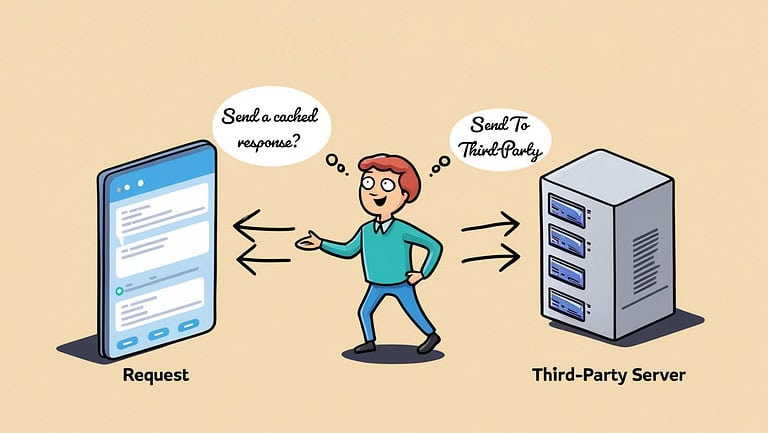
In the world of digital commerce, the “In Stock” button is more than a piece of data; it’s a promise to your customer. Break that promise with a follow-up “sorry, we oversold” email, and you’re not just losing a sale—you’re torching brand trust. This is the reality that keeps business stakeholders up at night. They demand absolute inventory certainty to protect the customer experience.
However, for us, the architects and developers in the trenches of Salesforce B2C Commerce, this demand presents a significant technical challenge. The most straightforward path to real-time accuracy—a live, synchronous API call for every product view—is a direct declaration of war on your storefront’s performance. It’s a surefire way to cripple your Time to First Byte (TTFB), overload your backend systems, and cause your site to crash precisely during a high-stakes launch or sales event.
This isn’t just a technical decision; it’s a high-stakes balancing act between the ideal of accuracy and the practical limits of performance. This is every architect’s nightmare. Successfully managing this balance distinguishes experienced professionals from those overwhelmed by the challenge.
The Omnichannel Imperative: Why Your Inventory Is Lying
Let’s be brutally honest: if you’re selling on more than one channel, your SFCC storefront’s native inventory is, by default, a snapshot of a moment in time. It’s a well-intentioned liar.
Modern retail is no longer a set of isolated storefronts. It’s a fluid ecosystem where a single stock pool serves your SFCC site, your brick-and-mortar stores with BOPIS, third-party marketplaces, and every other channel you can imagine. This isn’t a trend; it’s the new standard operating procedure. The business demands a single source of truth for inventory, because without it, you’re not an omnichannel brand—you’re just multiple businesses fumbling under the same logo.
This is where the problem begins. SFCC’s native inventory system is perfectly capable for a business that only sells through SFCC. It tracks stock, manages pre-orders, and calculates Available-to-Sell (ATS) quantities based on the data it has. But that data typically arrives via periodic batch imports—often an XML feed dropped into Business Manager. This introduces latency. It’s a picture of what inventory was, not what it is.
When a product sells out in a physical store, your SFCC site remains blissfully unaware for the next 15, 30, or 60 minutes, leaving a gaping window for overselling. This forces a critical architectural shift: the source of truth for inventory can no longer be SFCC. It must be a centralised master system, like an ERP or OMS. SFCC is demoted from master to consumer, and the need for real-time checks is born not from a flaw in the platform, but from the fundamental reality of a distributed commerce landscape.
The Hammer Effect: How Real-Time Calls Kill Your Storefront
The Anatomy of a Slowdown
Here’s what happens when you make that call:
A user requests a PDP.
The eCDN gets a cache miss because inventory is now dynamic. The request is passed to the SFCC application tier.
Your server-side controller logic initiates an outbound API call to the external ERP/OMS.
The entire page render process stops and waits. It waits for the network round-trip. It waits for the external system to process the query. It waits for the response to come back.
Only after the response is received can SFCC finish building the page and send the first byte back to the user’s browser.
TTFB Under Fire
That wait time directly murders your Time to First Byte (TTFB). Salesforce has performance targets for a reason: 300ms for a PDP (Product-Show), 400ms for the cart. A single external API call can easily blow past those targets, turning a snappy user experience into a frustrating crawl. A slow TTFB isn’t just a bad metric; it’s a conversion killer.
The Self-Inflicted Denial of Service
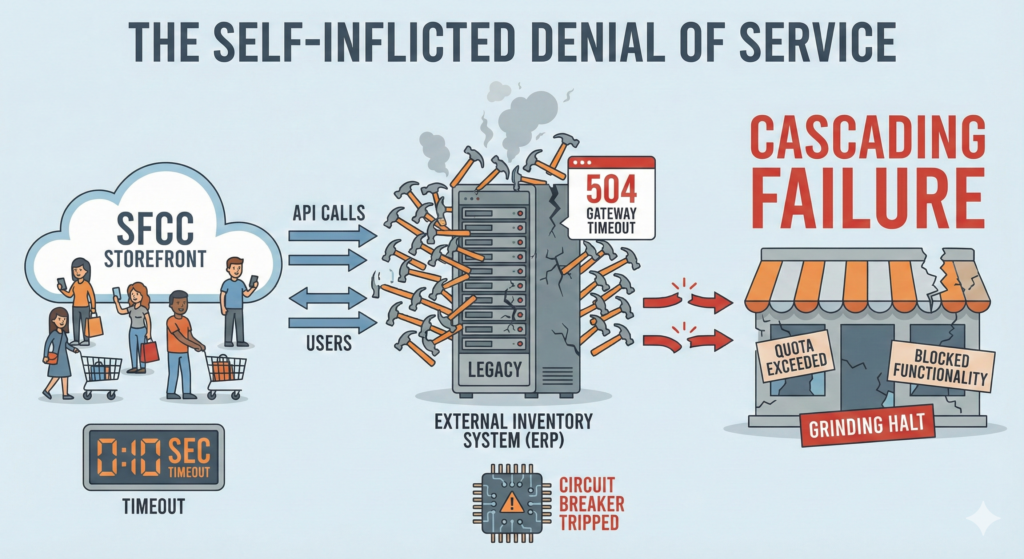
This gets exponentially worse under load. During a flash sale, thousands of simultaneous users on your PDPs translate into thousands of concurrent API calls hammering your external inventory system. This is the “Hammer Effect.” Many ERPs, especially legacy ones, weren’t built for this kind of web-scale abuse. They slow down, time out, or fall over completely.
The consequences reverberate back to SFCC. The platform has a hard 10-second timeout on Shopper APIs; exceed it, and the user gets a 504 Gateway Timeout. The Service Framework’s circuit breakers will trip if the external system consistently fails to respond, causing subsequent calls to fail instantly. You risk exceeding your API quotas, which can lead to blocked functionality. You’ve created a cascading failure, where a slow dependency starves the platform of resources, grinding the entire storefront to a halt at the most critical moment.
Your First Line of Defense: Caching the Uncacheable
Given that naive real-time calls are a performance catastrophe, caching isn’t an optimisation—it’s a prerequisite for survival. SFCC provides multiple layers of caching, from the full Page Cache at the eCDN level down to fragment caching with remote includes.
The problem with inventory is its volatility. If you have inventory data with a 60-second stale time on a page with product details, that can have an 8-hour caching lifetime.
This is where the architect’s true weapon comes into play: the SFCC caching armoury.
This knowledge unlocks more intelligent strategies. You’re not just caching data; you’re caching a decision (e.g., isOrderable = true), which is far more powerful and efficient.
The Pragmatist's Playbook: The Hybrid Threshold Model
The Core Logic
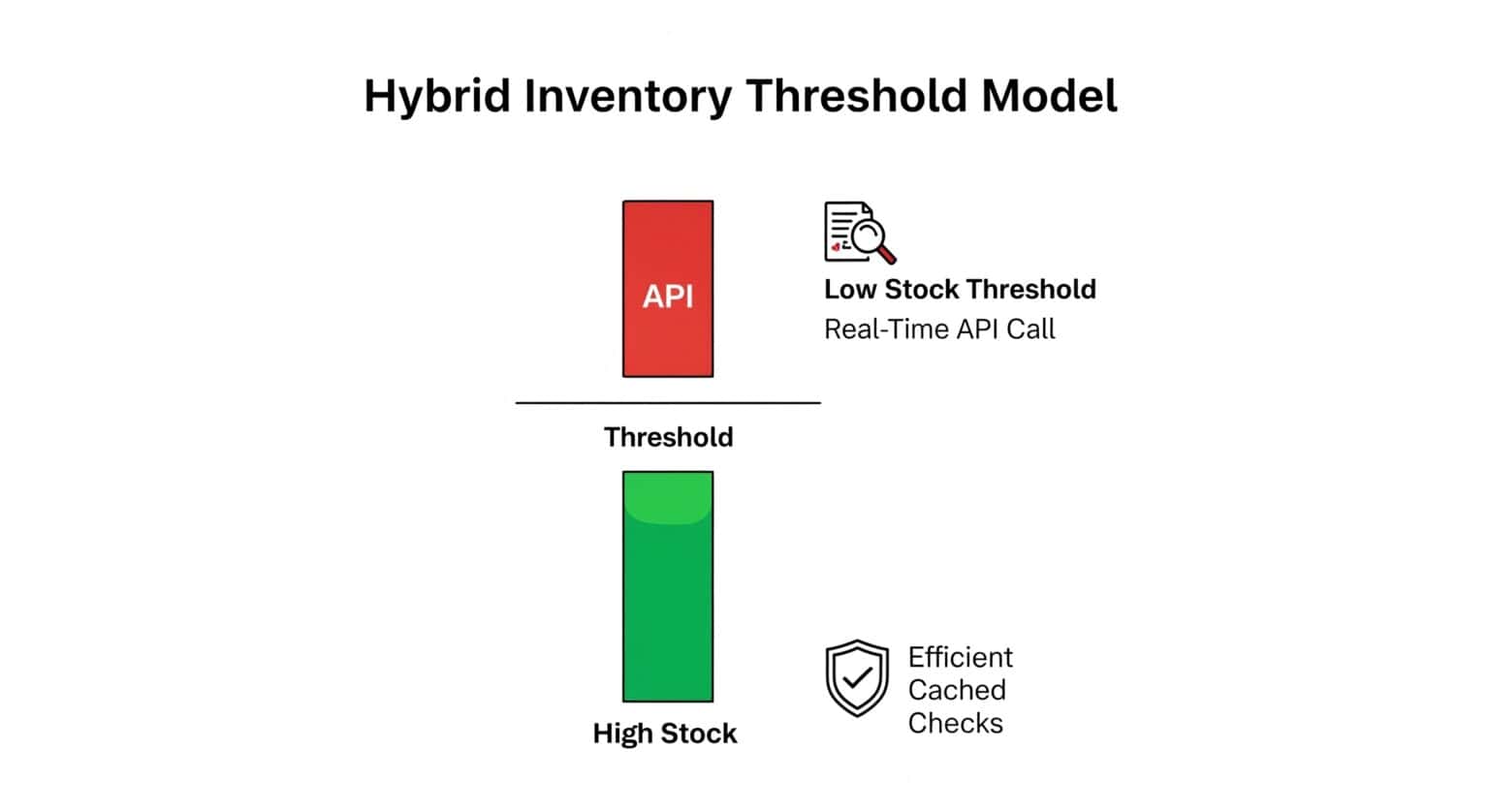
The model is governed by a “low stock threshold”—a simple number (e.g., 5 units) that dictates the system’s behaviour. This concept is a common feature in e-commerce platforms, triggering urgency messaging.
-
Path 1: Above the Threshold (The Fast Lane) When SFCC’s internal inventory record shows stock is comfortably above the threshold, the risk of overselling is low. The system does not make a real-time call. It serves a generic, cached “In Stock” message. This response is lightweight and can be cached for a reasonable duration (e.g., 15-120 minutes). This path handles the vast majority of traffic, ensuring lightning-fast PDP loads.
-
Path 2: At or Below the Threshold (The Accuracy Zone) When stock drops to or below the threshold, the game changes. The cached status is invalidated. Now, every request for this product’s availability triggers a live, synchronous API call to the external master to get the exact count. To prevent hammering the backend for a popular low-stock item, this live response is itself cached, but with a very aggressive TTL (e.g., 10-30 seconds).
The Trade-Offs
This is a powerful compromise, but it’s not a silver bullet.
Pros:
Performance on a Massive Scale: You eliminate costly external calls for the bulk of your catalog, dramatically improving average TTFB and site responsiveness.
Backend System Shield: The cache absorbs most of the load, protecting your often-fragile ERP or OMS from the “Hammer Effect.”
Risk-Aligned Architecture: You spend your performance budget only when the business risk of an oversell is tangible.
Cons:
Custom Development Required: This isn’t a checkbox in Business Manager. It requires custom logic to manage the dual paths, the custom cache, and the invalidation process.
Minor Race Condition: A small window of risk remains. If the threshold is 5 and SFCC shows 6, two customers could check out before the next batch feed runs. This is why a final, definitive real-time check during the final order submission is non-negotiable. The PDP check is for browsing performance; the checkout check is for transactional integrity.
Leveling Up: Advanced Tactics for the Bold
Asynchronous Front-End Checks (AJAX - React)
This pattern decouples the inventory check from the initial page render entirely.
The server sends the PDP’s HTML to the browser immediately, without any inventory data, resulting in a stellar TTFB. The page appears with a placeholder like “Checking availability…”
Client-side JavaScript then makes an asynchronous (AJAX) call to a dedicated, lightweight SFCC API endpoint.
When the response arrives, the JavaScript updates the placeholder with the real stock status.
The user-perceived performance is phenomenal. The core content loads instantly, and the secondary stock information fills in a moment later. This can be combined with the Hybrid Threshold Model on the backend API endpoint for maximum effect.
This is also a perfect use case for client-side rendering in the PWA Kit.
Event-Driven Architecture (EDA): The Paradigm Shift
This is the enterprise-grade solution. Instead of SFCC pulling data on demand, the master inventory system pushes updates whenever a change occurs.
-
An event broker (like Kafka or RabbitMQ) sits at the heart of the architecture.
-
When a sale happens in a physical store, the POS system publishes an
InventoryDecrementedevent to the broker. -
A custom service subscribed to this event stream immediately updates the inventory record within SFCC.
This approach maintains SFCC’s native inventory in a near-real-time state, eliminating the need to block outbound calls during the shopper’s journey. It represents the pinnacle of performance and scalability, but it requires a significant architectural investment.
But wait… an external system pushing inventory near real-time to SFCC inventory lists… that sounds familiar.
The Salesforce Answer: Is Omnichannel Inventory (OCI) Your Silver Bullet?
Salesforce is acutely aware of this architectural nightmare. Their answer is Omnichannel Inventory (OCI), a headless, API-first, and highly scalable inventory service designed to be the single source of truth.
I wrote an extensive article on this topic a while ago, so I recommend reading it.
The Build vs. Buy Decision
OCI Benefits ("Buy"):
Speed: OCI significantly reduces the development time and complexity of building a custom eventing platform from scratch.
Lower TCO: While there’s a license cost, it pales in comparison to the expense of building, maintaining, and monitoring a custom, high-availability integration platform. One case study projected a 32% reduction in IT costs for a retailer that adopted a solution including OCI.
Scalability & Cohesion: It’s built by Salesforce, for Salesforce. It’s designed to scale and integrate seamlessly with the rest of the Customer 360 platform, powering a unified experience that can have a real top-line impact—the same study projected a 40% increase in sales.
A custom solution only makes sense in the rarest of cases. For the vast majority of multi-channel retailers on Salesforce, OCI is the most logical, scalable, and cost-effective path to sanity.
Your Architectural Mandate
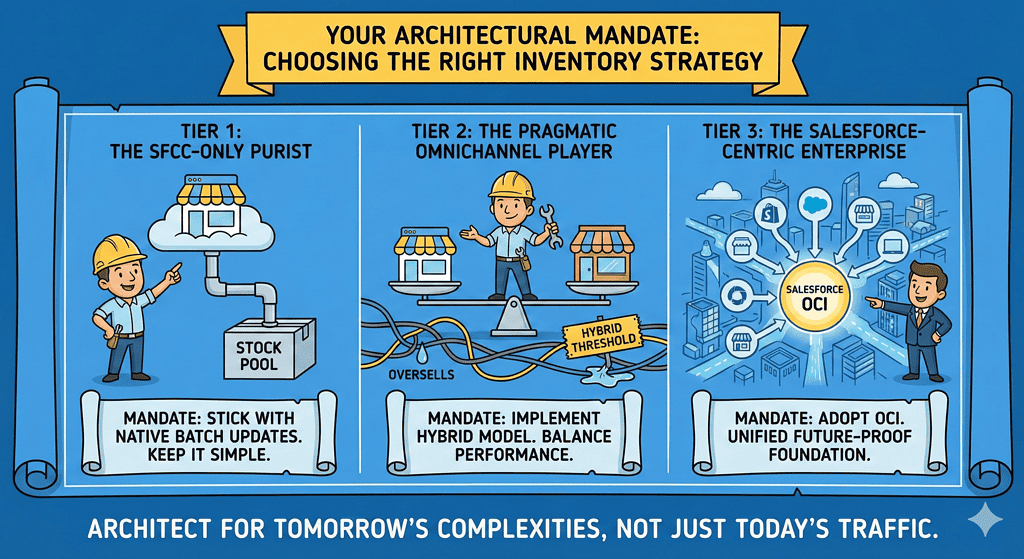
The right inventory strategy is a direct reflection of your business’s omnichannel maturity. There is no one-size-fits-all answer, only a series of strategic trade-offs. Here is your mandate, based on your profile.
Tier 1: The SFCC-Only Purist
Profile: You sell only through your SFCC site from a dedicated stock pool.
Mandate: Stick with native SFCC inventory and reliable batch updates. Anything else is over-engineering. Focus on making your import jobs fast and frequent.
Tier 2: The Pragmatic Omnichannel Player
Profile: You sell across SFCC and physical stores from a shared inventory. You need to stop the bleeding from oversells and fix site performance now.
Mandate: Implement the Hybrid Threshold Model with Asynchronous AJAX checks. This is your sweet spot. It delivers the best balance of performance, accuracy, and implementation effort without requiring a complete overhaul of your architecture.
Tier 3: The Salesforce-Centric Enterprise
Profile: You’re a large, complex enterprise running multiple brands and channels, deeply invested in the Salesforce ecosystem. Unified commerce is a core strategic goal.
Mandate: Adopt Salesforce Omnichannel Inventory (OCI). Don’t even think about building it yourself. The “buy” decision is a strategic imperative that will deliver faster time-to-market, lower TCO, and a future-proof foundation for true unified commerce.
Choosing an inventory strategy is one of the most critical architectural decisions you will make. It dictates your site’s performance, your customers’ trust, and your operational sanity. Don’t just build for today’s traffic; architect a platform that can withstand tomorrow’s complexities.