So, you need to add a custom attribute to the basket response, or maybe validate an order against a third-party fraud service before it’s created. Your first thought? A SCAPI hook. You’re not wrong, but you’re only seeing the tip of the iceberg.
Salesforce Commerce API (SCAPI) and OCAPI (Open Commerce API) hooks are one of the most powerful tools in our arsenal for extending the platform’s headless capabilities. They allow us to inject custom logic directly into the API lifecycle, tailoring the out-of-the-box behaviour to meet unique business requirements. But let’s be clear: with great power comes great responsibility.
The official documentation provides the “what” and the “how,” but it’s in the wild, under a production load, where the real lessons are learned. These powerful tools, if used improperly, can be extremely hazardous, potentially introducing security vulnerabilities, performance bottlenecks, and maintenance issues.
This isn’t just a rehash of the official docs. This is a field guide, a playbook forged from experience. We’re going to dive deep into the critical areas that documentation often glosses over: security hardening, performance tuning, bulletproof error handling, and avoiding the architectural traps that lead to what architects call a “Big Ball of Mud”. We’ll cover everything from the fundamental anatomy of a hook to advanced strategies like idempotency and circuit breakers.
Our roadmap is clear: we’ll start with the fundamentals, then navigate the security gauntlet, tackle the need for speed, prepare for when things go wrong, and finally, tour the hall of shame of common anti-patterns.
Let’s get started.
The Anatomy of a "Hook"
Before we can master SCAPI and OCAPI hooks, we need to understand them from the ground up. This means not only knowing what they are but also what they are not, and how they fit into the broader SFCC extensibility landscape.
What Are Hooks, Really?
At their core, hooks are a mechanism for altering and extending the behaviour of existing API resources using server-side B2C Commerce Script API logic. They are not standalone endpoints; rather, they are extension points that allow you to inject your custom code into the platform’s standard API request lifecycle.
This brings us to a critical architectural crossroads. The platform provides two primary methods for adding custom server-side logic to SCAPI and OCAPI: hooks (SCAPI / OCAPI) and Custom APIs (SCAPI only). The choice you make here will define the maintainability and scalability of your solution.
Hooks are fundamentally tethered to an existing Salesforce endpoint, like /baskets or /orders. They can only react to calls made to that endpoint. Their purpose is to augment an existing process. For example:
Adding a custom attribute to the basket response.
Validating a shipping address against a third-party service.
Calculating a complex, custom surcharge on an order.
Custom APIs, on the other hand, allow you to create and expose entirely new, net-new REST endpoints under the SCAPI framework. If your goal is to introduce a new capability that doesn’t logically fit within an existing API’s model, a Custom API is the correct strategic choice:
A
/loyalty-infoendpoint to fetch a customer’s points balance.A
/pickup-point-locatorendpoint to find nearby physical stores.An endpoint to handle a custom newsletter signup form.
The introduction of Custom APIs, especially with the 23.9 release, was a game-changer, moving us beyond the old workarounds of trying to tweak existing endpoints to serve entirely new purposes.
Choosing the wrong tool leads to technical debt.
Trying to shoehorn new functionality into an existing hook results in convoluted, hard-to-maintain code that compromises the original intent of the endpoint. Make the right architectural choice before you write a single line of code.
The Three Musketeers: before, after, and modifyResponse
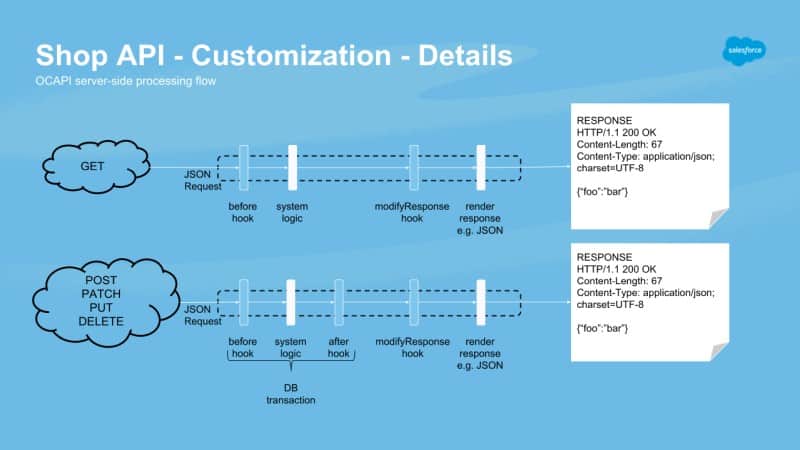
SCAPI and OCAPI hooks come in three main flavours, each with a distinct role in the request lifecycle. Understanding their specific purpose and limitations is crucial to using them correctly.
before<HTTP_Method>: This hook executes before the server performs its main processing. Its primary role is to validate input and preprocess the incoming request document. This is your first line of defence, where you can perform status checks, apply additional filtering logic, or validate data before it ever touches the core system objects.after<HTTP_Method>: This hook executes after the server’s main logic has completed but before the final response document is created. It operates on the modified Script API object (e.g., theBasketorOrderobject). This is the place for side effects and integrations, such as sending a newly created order to an external ERP, triggering a basket recalculation (dw.order.calculate), or performing change tracking.modify<HTTP_Method>Response: This is the final step in the chain. It executes after the platform has already created the response document from the Script API object. Its sole purpose is to make final modifications to the response document, such as adding or removing custom attributes (c_fields) or cleaning up data before it’s sent to the client. A critical point: this hook is not transactional. Attempting to modify a persistent Script API object here will result in anORMTransactionExceptionand an HTTP 500 fault
Not all APIs are made equal
Feature switch for SCAPI
As it stands, Salesforce B2C Commerce Cloud disables hooks by default for the SCAPI. To enable hook support, a feature switch needs to be enabled in the Business Manager:
“Administration > Global Preferences > Feature Switches”

Step 1: Register your customizations
The first step in writing hooks for our APIs is registering them with the server. To do this, you need to do the following steps.
Create a “hooks.json” file
We need to create a JSON file that describes which endpoints we want to customise called “hooks.json.” This file can be put anywhere in a cartridge. But in this case, we will put it in the root ( e.g. “my_project/cartridges/my_cartridge/hooks.json ) as an example.
					{
    "hooks": [
        {
            "name": "dw.ocapi.shop.basket.beforePATCH",
            "script": "./cartridge/scripts/hooks/basketHooks.js"
        },
        {
            "name": "dw.ocapi.shop.customers.password_reset.afterPOST",
            "script": "./cartridge/scripts/hooks/passwordHooks.js"
        }
    ]
}
In this file, we “hook” the customisation script to the REST endpoint we want to extend.
We can define as many as we want within the file! But make sure every “name” is unique. If it is not, there might be some unexpected behaviour.
Update the “package.json” cartridge file
The next step is to create or edit your cartridge’s “package.json” file.
The file should be in the root folder of your cartridge. (e.g. “my_project/cartridges/my_cartridge/package.json”)
					{
  "hooks": "./hooks.json",
  ...
}
Salesforce B2C Commerce Cloud parses this file to enable specific customisations, including hooks.
Step 2: Build your customisations
You probably noticed that we need to define a “script” file for each hook we register. But we have not created those files until now, so let us do that!
Look up the endpoint documentation
Before we start writing the code, we need to know what function to export in our script for the system to pick up our customisation. This information can be found in the Infocenter.
First, we locate the endpoint we want to override. The documentation will show us more information about the function behind it.
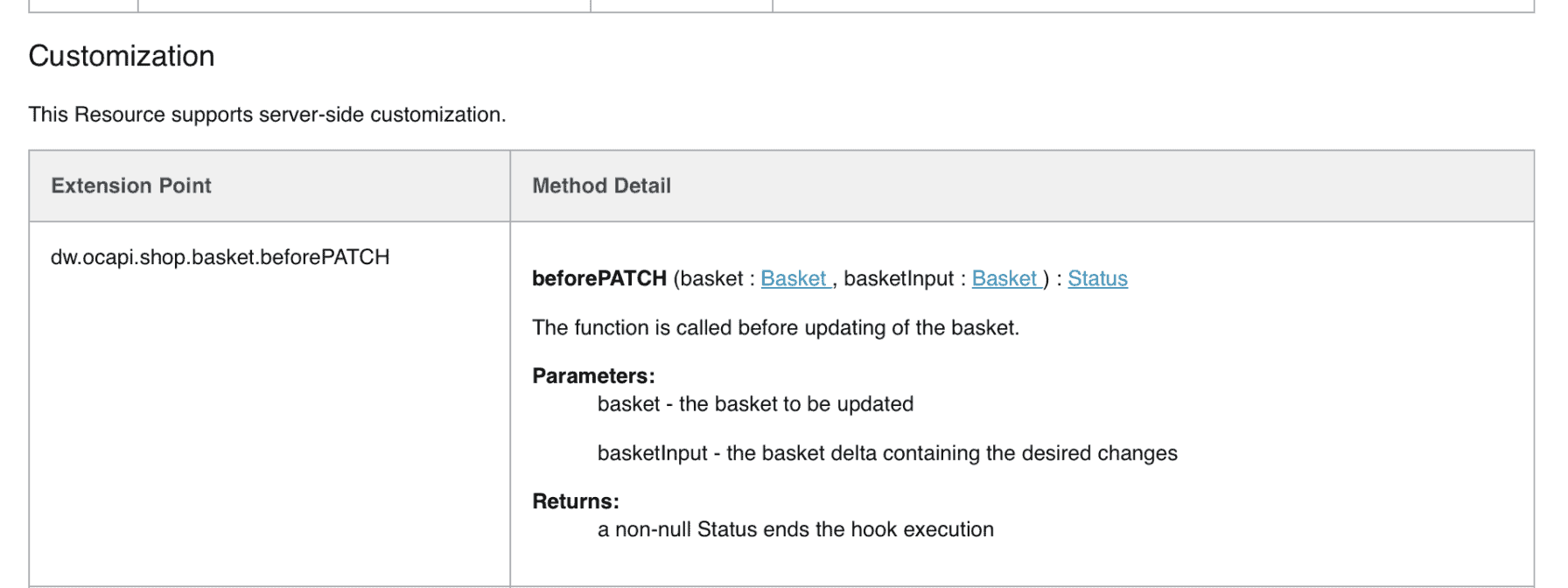
In this case, we need to export the function “beforePATCH” with the parameters “basket” and “basketInput.”
Put that documentation to work
Now that we know what function to use, we can start writing some code.
					/**
 * This can be used to update the basket server side, if for instance we need to call a tax service or sync the basket.
 * The client app can retrieve this updated basket by doing a PATCH request.
 */
exports.beforePATCH = function (basket, basketInput) {
    var productLineItems = basket.getProductLineItems();

    /** pass on something to ensure hooks are executed */
    for (var i = 0; i < productLineItems.length; i += 1) {
        productLineItems[i].setLineItemText('PRODUCT ' + productLineItems[i].getLineItemText());
    }
};
Detecting OCAPI vs SCAPI
We may have a scenario where the OCAPI and the SCAPI use the same endpoint and have their unique customisations. To detect SCAPI calls, the request object/class has recently received a helper function:
request.isSCAPI()
Step 3: Test if it works!
That wasn’t so much work now, was it? All that is left is to test that our custom code is executed correctly! I recommend Postman to do so.
Maybe a list of things to keep in mind:
- Don’t forget to upload your cartridge!
- Don’t forget to add the cartridge to the correct cartridge path!
- Call the correct endpoint!
- Call the correct environment!
Some of these might seem obvious, but it is easy to get mixed up when working with tools such as Postman.
The Security Gauntlet: Fortifying Your Hooks
We must build our customisations to be robust, as an exception can cause the entire API to fail!
Be sure to catch exceptions and log them appropriately so we can monitor and fix any exceptions that might occur.
Now that we know how to build a hook, let’s discuss how to create a secure one. This is not optional. A poorly secured hook can expose your application to significant risk.
Salesforce has provided a list of constraints and best practices on the documentation site!
The Shared Responsibility Pact
Let’s be crystal clear on the security context. Salesforce is responsible for securing the API endpoints, the underlying platform, and the infrastructure on which it runs. This includes authentication at the API gateway and authorisation based on scopes. However, under this shared responsibility model, you are responsible for the security of any custom code you write, and that absolutely includes hooks.
When a SCAPI request arrives, it’s first authenticated and authorised by the gateway based on the client’s Shopper Login and API Access Service (SLAS) token, along with its associated scopes. Only then is the request passed on for processing, which is where your hook executes. The hook script runs with powerful server-side permissions, and this is where the danger lies. A developer, focused on a simple task like adding a custom field, might implicitly trust that the initial gateway authorisation is sufficient. This is a critical mistake.
Your hook script has direct access to sensitive Script API objects, such as Order, Customer, and Basket. Without its own internal checks, it can be manipulated. For example, a PATCH request /orders/{order_id} might be authorised by the gateway for the orders scope, but the gateway doesn’t know if the authenticated user actually owns that specific order_id. It’s the hook’s job to verify ownership. A hook that blindly trusts the data it receives creates a massive security hole. It can function as a “confused deputy,” where an unprivileged user can make privileged calls through your code. The mantra must be: re-authenticate and re-authorise within the hook.
Never Trust, Always Verify: Authentication & Authorization in Hooks
This principle must be applied rigorously. When your hook code deals with sensitive objects, you must always use the secure Script API methods that require a secondary token or secret that only the legitimate owner would possess.
For instance, the dw.order.OrderMgr class provides two ways to retrieve an order. One is dangerously insecure in this context; the other is the correct choice.
					var OrderMgr = require('dw/order/OrderMgr');

// INSECURE: AVOID in hooks where ownership is not yet verified.
// An attacker could pass any valid order number.
var order = OrderMgr.getOrder(orderNumber);

// SECURE: PREFERRED in hooks.
// The orderToken is a secret known only to the user who placed the order.
// This token should be passed in the request from the client.
var order = OrderMgr.getOrder(orderNumber, orderToken);
This pattern extends to other sensitive objects. Always perform additional checks to confirm the user’s authority to perform the requested action.
For guest shoppers, where you don’t have an authenticated session, this is even more critical. You should consider prohibiting guest shoppers from changing existing orders or requiring them to provide a combination of secrets from the order (e.g., order number and the email address used) before allowing any modification.
Sanitise Everything: The Gospel of Input Validation
Your before hooks are the primary gatekeepers for all incoming data. They must be ruthless in their validation. Failing to validate and sanitise user-provided input opens the door to a host of attacks, including Cross-Site Scripting (XSS) and various injection attacks that could compromise your server or database.
The best practice here is to adopt a whitelisting (or allowlisting) approach. Instead of trying to block known bad inputs (blacklisting), you should define exactly what is permitted and reject everything else. This is a far more secure posture, as attackers continually find new ways to circumvent blacklists.
Your validation logic should check for type, length, format, and range on every single field you process.
					// Example validation in a beforePUT hook for a customer address
exports.beforePUT = function (customer, addressId, addressDoc) {
    var Status = require('dw/system/Status');
    var status; // This will hold the Status.ERROR object if any validation fails.

    /**
     * A helper function to initialize the error Status object on the first validation failure.
     * This prevents creating the object unnecessarily and keeps the code clean.
     * @returns {dw.system.Status} The status object, initialized to ERROR if it wasn't already.
     */
    function getErrorStatus() {
        if (!status) {
            // Create a single ERROR status with a custom code the client can use.
            status = new Status(Status.ERROR, 'AddressValidationError');
        }
        return status;
    }

    // Example: Validate postal code format for a specific country
    if (addressDoc.country_code === 'US' && !/^\d{5}(-\d{4})?$/.test(addressDoc.postal_code)) {
        // Add a machine-readable key and a human-readable message for this specific error.
        getErrorStatus().addDetail('INVALID_POSTAL_CODE', 'Invalid US postal code format.');
    }

    // Example: Prevent overly long city names
    if (addressDoc.city && addressDoc.city.length > 50) {
        getErrorStatus().addDetail('CITY_NAME_TOO_LONG', 'City name exceeds maximum length of 50 characters.');
    }

    // Example: Ensure required fields are present
    if (!addressDoc.first_name || !addressDoc.last_name) {
        getErrorStatus().addDetail('MISSING_REQUIRED_FIELDS', 'First and last name are required.');
    }

    // If 'status' was created, an error occurred, so return it.
    // Otherwise, all checks passed, so return an OK status.
    return status || new Status(Status.OK);
};
Implement the same hook in multiple cartridges
In a single hooks.json file, you can register multiple modules to call for an extension point. However, you can't control the order in which the modules are called. If you call multiple modules, only the last hook returns a value. All modules are called, regardless of whether any of them return a value.
At run time, B2C Commerce runs all hooks registered for an extension point in all cartridges in your cartridge path. Hooks are executed in the order their cartridges appear on the path. Each cartridge can register a module for the same hook. Modules are called in cartridge-path order for all cartridges in which they are registered.
The text above has been taken from the Salesforce B2C Commerce Cloud Infocenter and turns out not to be correct (at least for SCAPI/OCAPI hooks.

This does have a slight nuance: It is not the case for all endpoints. Luckily this is documented for every hook!
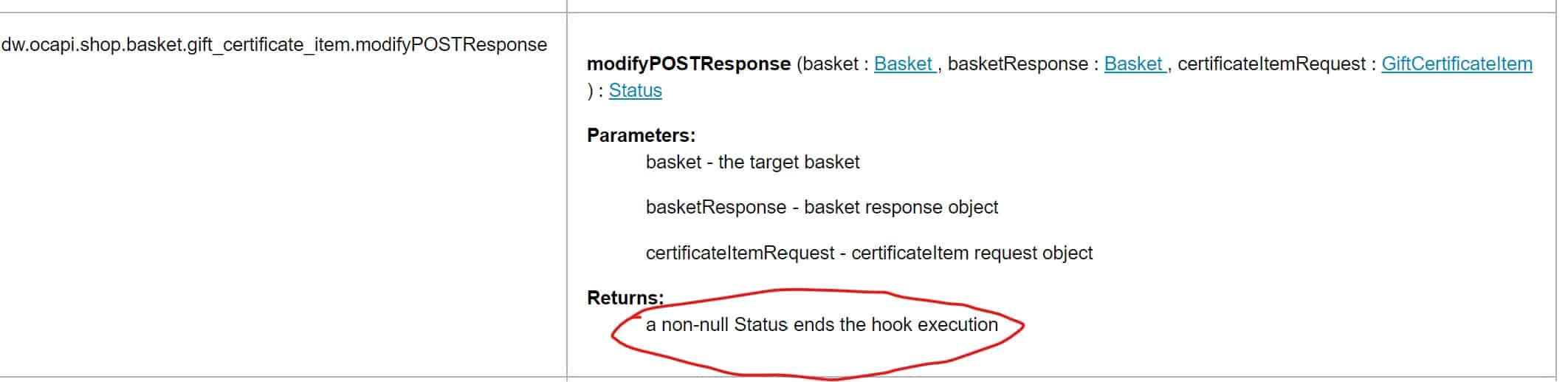
So basically: never return the following code in your hooks when your custom code completes successfully (if the endpoint supports it):
return new Status(Status.OK);
Sometimes, your linter will complain about not returning a value in all branches. But you must ignore that warning to avoid breaking another cartridge hook. (Unless you want to break the chain!)
An example where a linter will complain:
					exports.beforePOST = function beforePOST(registration) {
    var Status = require('dw/system/Status');

    var verificationResult = validate(registration.customer);

    if (!verificationResult) {
        return new Status(Status.ERROR, 'ERR-TS-02', Resource.msg('turnstile.errors.ERR-TS-02', 'turnstile', null));
    }

    // Your linter will want a return statement here
};
The Need for Speed: Performance Tuning Your Hooks
A functional hook is different from a performant hook. Every line of code added to a hook increases the ‘overhead tax’ on the API’s response time.
The Overhead Tax: The Cost of Customization
Let’s be blunt: hooks are inherently slower than the out-of-the-box APIs. This is because your custom script execution is layered on top of the platform’s own code. This is a trade-off you make for the sake of flexibility.
The performance shared responsibility model is clear: Salesforce is responsible for the performance of its base API code. You, the developer, are responsible for the performance of your catalog structure, the parameters you send in requests, and every single line of your hook script. A slow hook can bring a snappy API to its knees.
Your Best Friend, The Code Profiler
You can’t optimise what you can’t measure. The B2C Commerce Code Profiler is the essential tool for diagnosing performance issues in your custom code. It allows you to see exactly how much time is being spent in different parts of the application flow.
The profiler has several modes, each with a different level of detail and performance impact :
Production Mode: Measures a subset of requests with minimal performance impact. Good for getting an aggregated view on a live system.
Development Mode: Measures all requests with more detail. This is the default for sandboxes and has some runtime overhead.
Extended Script Development Mode: Provides deep insight into script execution, down to the line level. It has a severe performance impact and should be used with extreme caution, especially on production instances.
To zero in on your hook’s performance, open the Code Profiler (Administration > Operations > Code Profiler). Select the appropriate mode, and look in the results for the SCRIPT_HOOK result type. This displays the execution times for your hooks, allowing you to quickly identify bottlenecks.
Optimization Tactics for High-Performance Hooks
Once you’ve identified a slow hook, here are the primary tactics for speeding it up:
Minimize External Service Calls
This is, without a doubt, the most common and most severe performance killer. A hook that makes a synchronous call to a slow third-party service will hold up the entire API response. If you absolutely must call an external service, you must use the B2C Commerce Service Framework. This framework is designed for this purpose and provides critical features, such as configurable timeouts and a circuit breaker, which can prevent a failing external service from cascading into a full-blown site outage.
Strategic Caching
Caching is a powerful tool, but with hooks, it’s a double-edged sword. A modifyGETResponse. For example, the hook is only executed if the cache for that API response is empty or stale. If your hook injects highly dynamic or user-specific data into a response (e.g., “Welcome back, John!”), You have effectively made that response uncacheable for anyone else. What was once a fast, globally cached response from the eCDN now requires a full server-side execution for every single request. This can dramatically increase server load and latency.
Therefore, you must be acutely aware of the “cacheability” of the data you inject. Use modifyResponse hooks on GET requests with extreme caution. If possible, load highly personalised data via a separate, non-cached API call from the client after the main, cacheable content has loaded.
For expensive, repeatable operations within a hook (like a complex data transformation), you can leverage B2C Commerce Custom Caches to store the result, but be mindful of their size limits (20MB total, 128KB per entry)
Efficient Data Handling
Don’t process more data than necessary. Before your hook even runs, the initial API call from the client should use the select and expand parameters to request only the necessary data fields.
If your modifyResponse hook on the product details page only needs to add a custom warranty field, the client shouldn’t be asking for all image groups, all variation attributes, and all set products. The less data the platform has to retrieve and your hook has to parse, the faster it will be.
When Things Go Wrong: Error Handling & Idempotency
A hook that works perfectly on a sunny day is easy to write. A truly robust hook is one that behaves predictably and safely when things go wrong.
Building Resilient Hooks: Beyond the try-catch
Any unhandled exception thrown from within your hook script will cause the entire database transaction to roll back, resulting in an HTTP 500 Internal Server Error being returned to the client. This is a jarring experience for the user and can mask the root cause of the problem.
Therefore, every hook function you write should be wrapped in a comprehensive try-catch block. When an error is caught, you must log it with enough context to be useful for debugging. Use the standard B2C Commerce logging framework (dw.system.Logger) to write detailed messages to a custom log category in the Log Center.
Include identifiers such as the basket UUID or customer ID to facilitate easier troubleshooting.
The Circuit Breaker Pattern: The Platform's Self-Defence
Your error handling strategy isn’t just about logging, it’s about platform stability. B2C Commerce has a built-in self-defence mechanism called the Hook Circuit Breaker. If a specific hook extension point fails more than 50 times in its last 100 calls, the circuit “opens.” For the next 60 seconds, all calls to that failing extension point will be immediately rejected with an HTTP 503 Service Unavailable and a HookCircuitBreakerException, without ever executing your code.
Think about the implications. A buggy hook doesn’t just return an error for one user; it can render an entire API endpoint, such as adding a payment to the basket, completely unavailable for all users for a full minute. A transient issue, like a third-party payment gateway being temporarily down, could cause a cascade of hook failures, tripping the breaker and turning a minor hiccup into a major outage. This elevates your try-catch block from a simple best practice to a mission-critical component.
Gracefully catching external failures and returning a non-error status (if the failure is not critical to the core transaction) is essential to prevent your hook from taking down a piece of your storefront.
The Hall of Shame: SCAPI Hook Anti-Patterns
To wrap up, let’s tour the gallery of common mistakes and anti-patterns. Avoid these, and you’ll be well on your way to writing clean, maintainable, and robust hooks.
The “God” Hook: A single, monolithic script file (
hooks.js) that contains the logic for dozens of different extension points. This violates the Single-Responsibility Principle, resulting in a tangled mess that is difficult to read, debug, or maintain.The “Chain Breaker”: A hook that incorrectly returns
new Status(Status.OK)when it should simply allow processing to continue to other hooks later in the cartridge path. Unless you explicitly intend to short-circuit the execution chain, a successful pass-through hook should often have no return statement at all. Returning a status can prematurely stop the chain and silently disable functionality from base cartridges or other customisations.The “Silent Failure”: A hook that swallows exceptions in an empty
catch {}block or logs a useless message like “error occurred.” This makes troubleshooting a nightmare and can conceal critical system failures until they result in major data corruption.The “Leaky” Hook: A
modifyResponsehook that adds internal-only data, debugging information, or sensitive PII to an API response, which is then exposed directly to the client browser.The “Chatty” Hook: A hook that makes multiple, inefficient, synchronous calls to external systems within a single execution instead of designing a more efficient bulk or batch data-fetching strategy.
The “Trusting Fool”: The most dangerous of all. A hook that blindly accepts and uses input from the request document without performing its own rigorous validation and authorisation checks, as detailed in our security section.