
For years, the Salesforce B2C Commerce go-live process has been a well-trodden path. The Site Readiness Assessment (SRA) served as our trusted map, guiding us through the checkpoints of specification reviews, launch gates, and operational readiness. We knew the terrain of Storefront Reference Architecture (SFRA), its monolithic structure, and its performance quirks. We were comfortable.
That comfort is now a liability.
Launching a headless mobile application on the Salesforce Commerce API (SCAPI) and Shopper Login and API Access Service (SLAS) is a fundamentally different expedition. The old SRA is still a valuable guide for platform best practices, but it’s a dangerously incomplete map for this new territory. The game has changed. The focus shifts from a tightly-coupled application to a decoupled architecture where the API is the product, the mobile client is an intelligent actor, and performance is a shared responsibility.
This article provides the new checklist—a definitive guide that respects the wisdom of the SRA while charting the critical new domains of API-first development, client-side intelligence, and mobile-specific delivery.
The Hostname Question—Demystifying Your Production Endpoints
Let’s tackle the first and most common point of confusion for teams moving from SFRA to headless: “Do my SCAPI calls need a separate hostname?” The question stems from an SFRA world where everything—the storefront, Business Manager, and even OCAPI—seems to live under the same domain umbrella.
The definitive answer is: Yes, SCAPI and SLAS operate on a completely separate hostname infrastructure from your SFRA site’s vanity domain.
Your mobile app will not make API calls to www.your-brand.com. Instead, all SCAPI and SLAS interactions are routed through the dedicated, globally scaled Salesforce Commerce API gateway. The endpoint URL follows a standard format: https://{{short-code}}.api.commercecloud.salesforce.com/.... This is your single, secure, and performant entry point for all API traffic. This move is intentional and reinforced by Salesforce’s deprecation of older, hyphenated hostnames (e.g., production-realm-customer.demandware.net) for API access, pushing all traffic to this unified gateway.
This separation of hostnames is not an arbitrary technical detail; it reflects the fundamental architectural decoupling that is the core promise of headless commerce.
Your vanity domain (e.g.,
www.your-brand.com) is for the presentation layer. It’s what customers see. The DNS manages routing and hostname alias configuration within B2C Commerce, which directs traffic through the eCDN.The API gateway domain (
{{short-code}}.api.commercecloud.salesforce.com) is for the data and service layer. It is a purpose-built infrastructure designed for high-scale, secure API transactions.
This separation allows for independent scaling, security policies, and evolution. You can completely redesign your mobile app (the “head”) without ever touching the API endpoint, and vice versa. SLAS, as the gatekeeper for Shopper APIs, runs on this same infrastructure, which is why its admin UI and authentication endpoints share the same base URL structure. The flow is simple: your mobile app calls SLAS to get a JSON Web Token (JWT), and then it includes that JWT in the Authorization header for all subsequent SCAPI calls.
So, where does your SFRA site’s configuration fit in? While the vanity domain isn’t the API endpoint, the underlying site configuration is still critical. Every SCAPI request includes a siteId query parameter. This siteId tells B2C Commerce which site’s context to use for the request—which catalog, which price books, which promotions to apply. That site is, in turn, configured in Business Manager and linked to your hostnames via the alias file. The hostname alias configuration remains essential for defining the context of your API calls, even though it’s not the endpoint you call directly.
The Headless Go-Live Checklist: From Backend to App Store
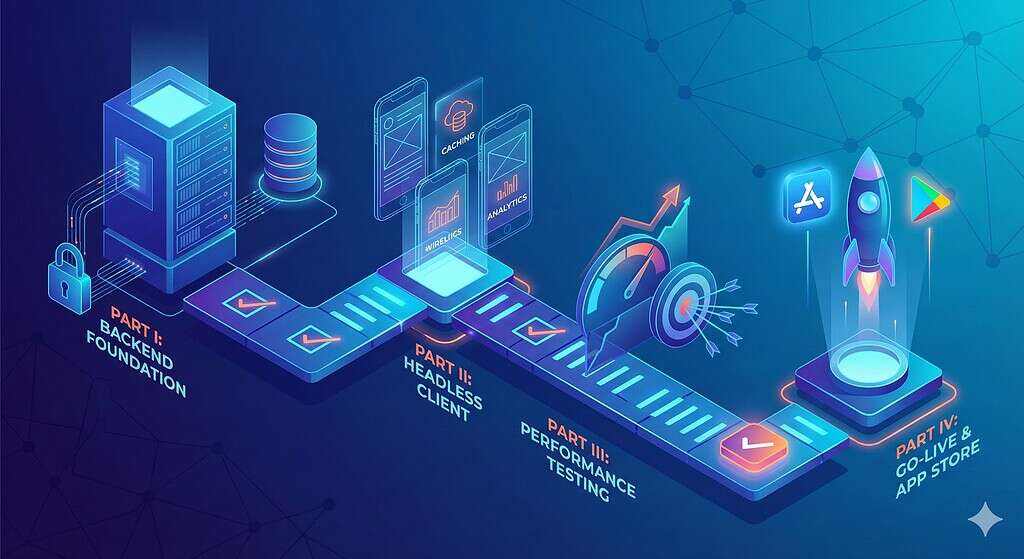
With the hostname question settled, we can proceed to the full checklist. It is divided into four parts, moving from the foundational backend configuration to the new frontiers of client-side logic and app store deployment.
Part I: Backend & Architectural Readiness (The Foundation)
This section adapts the SRA’s architectural principles to a headless context. The focus is on the solidity of the API contract and the backend configuration that will serve the mobile app.
API & Data Model Finalization (Your Contract with the Client)
Data Flow & Mapping: All data flow diagrams must be updated to reflect a decoupled architecture where the mobile app (or Headless site) is a primary target system. This includes verifying the flows for customer, product, inventory, and order data.
Custom Attributes & Objects: Every custom attribute and object required by the app must be finalised and documented. An attribute that is acceptable in a rarely-used SFRA template might become a performance bottleneck when requested in every
/productsAPI call. Its performance impact must be understood.Media Strategy: The strategy for serving images and video must be confirmed. Whether the app calls the B2C Commerce Dynamic Imaging Service (DIS) or an external provider like Amplience or Scene7 directly impacts implementation and performance.
Localisation & Multi-Site: The underlying site architecture (single vs. multi-site, locales, currencies) must be finalised. The mobile app will depend on this configuration to request the correct context for each user.
API Quotas: This is a LAUNCH BLOCKER. The development team must formally acknowledge and document all relevant API quotas. The mobile app’s design must operate within these limits to prevent service disruptions.
Authentication & Security Configuration (Locking the Gates)
SLAS Client Configuration: A final SLAS client for the production environment must be created and configured. If a customer facing system (in this case an app) is not able to securely store (and hide) a secret token, this must be a Public Client. The exact
redirectUriused for the OAuth flow within the app must be defined and allow-listed in the client configuration. If using third-party social logins (e.g., Google, Facebook), the Identity Providers (IDPs) must be fully configured in SLAS for the production tenant. In most cases a native application is able to store this information securely, but an audit is mandatory.OAuth Scopes (Least Privilege Principle): Granting overly permissive scopes is a common and dangerous oversight. A final audit of all scopes assigned to the production SLAS client is critical. This review should map every API endpoint the app uses to a specific, required scope and ensure no unnecessary permissions are granted. For example, if the app only reads basket data, it should not have the sfcc.shopper-baskets-orders.
rwscope. This adherence to the principle of least privilege reduces the “blast radius” if a token is ever compromised.Custom API Security: Every custom API endpoint must be adequately secured with a
ShopperTokensecurity scheme and a unique custom scope (prefixed withc_) in its OpenAPI Specification (OAS 3.0) definition. Unsecured custom endpoints are a critical vulnerability and will not be registered by the platform.CORS Policy: While less critical for native mobile apps than for web apps, if any web-based technologies or views are used, the Cross-Origin Resource Sharing (CORS) headers configured on the platform should be as restrictive as possible to prevent unauthorised cross-domain requests.
Infrastructure & eCDN (The Pipes)
SSL Certificates: Valid SSL certificates for all relevant domains must be in place and uploaded to the platform via Business Manager or the CDN-API. This is a launch blocker for secure communication.
Firewall Rules: All IP addresses for third-party integrations (payment, tax, OMS, etc.) must be allow-listed in the Commerce Cloud firewall. Forgetting this is a common go-live “gotcha” that can bring down critical services at the worst possible time.
eCDN WAFv2: Be aware of the Web Application Firewall (WAF) rules. While Salesforce manages the core OWASP ruleset, it is important to ensure that no legitimate traffic patterns from the mobile app are being inadvertently blocked.
Integrations & Jobs (The Engine Room)
Third-Party Services: All third-party integrations must be pointing to their respective production endpoints and must have been tested end-to-end.
Fault Tolerance: Critical integrations must use the B2C Commerce Service Framework with aggressive timeouts and circuit-breaker patterns. The mobile app or headless site must be designed to handle a failure of a third-party service gracefully, without crashing or locking up.
Backend Jobs: The entire job schedule on the PIG (Primary Instance Group) instances must be reviewed. Data import jobs (inventory, pricing, …) and data replication schedules should be staggered, run during off-peak hours, and use delta feeds wherever possible to minimise performance impact on the live application.
Part II: The Headless Client (The New Frontier)
This entire section is new territory compared to the SFRA SRA. The mobile app, for example, is not just a “head”—it’s an intelligent client with its own responsibilities for performance, data management, and user engagement.
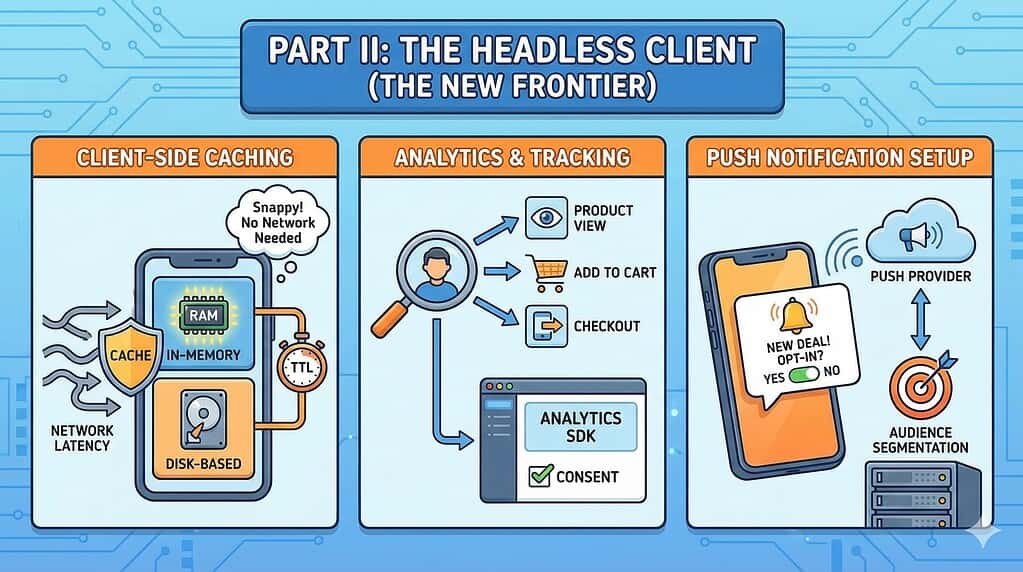
Client-Side Caching Strategy (Your First Line of Defense)
Effective client-side caching is the single most important factor for a snappy, responsive mobile app experience and for staying within API quotas. Network calls from a mobile device are inherently latent and unreliable. The app must not go to the network for data it already has. A comprehensive go-live requires verification of a robust, multi-layered caching strategy.
HTTP Caching: Verify the app correctly respects
Cache-Controlheaders from SCAPI responses. This is the simplest level of caching, often handled by the mobile OS’s networking stack.In-Memory Cache: For frequently accessed, short-lived data (e.g., data for the currently visible screen), confirm that an in-memory cache is used. This data is volatile and lost when the app closes.
“Disk-Based” Cache (Persistence): For data that must persist between app sessions (e.g., product catalog data, category structures, user preferences).
Cache Invalidation: Confirm that a clear strategy for cache invalidation is in place. Is it based on a Time-to-Live (TTL)? Is it cleared on specific user actions like logout? Stale data is as bad as no data.
Analytics & Tracking Implementation
Event Tracking: A comprehensive analytics plan must be defined and implemented. Key user actions (e.g., product view, add to cart, checkout step, search performed) must be tracked.
Tooling: The chosen analytics SDK (e.g., Google Analytics for Firebase, Adobe Analytics) must be correctly integrated and configured to point to the production environment.
Data Privacy & Consent: Verify that no tracking events are fired until the user has given appropriate consent, in compliance with regulations like GDPR and CCPA.
Push Notification Setup
Service Integration: The mobile app must be fully integrated with the chosen push notification provider, such as Salesforce Marketing Cloud MobilePush or Firebase Cloud Messaging.
SDK & Configuration: The provider’s SDK must be correctly configured within the app to handle device registration and the receipt of notifications.
Opt-in/Opt-out: The app must provide a clear and accessible UI for users to manage their push notification preferences.
Audience & Segmentation: In the backend system (e.g., Marketing Cloud), ensure that the necessary lists, data extensions, or audiences are created and populated to allow for targeted push campaigns immediately at launch.
Test Plan: A plan to send test notifications to specific test devices must be in place to verify the entire pipeline is working before go-live.
Part III: Performance & Load Testing (The New Discipline)
This section details another significant process change from an SFRA go-live. The focus shifts from testing the holistic performance of a web page to the granular, methodical testing of the API endpoints that power the app.
The Paradigm Shift: From Pages to Endpoints
Traditional SFRA performance testing relies on tools like WebPageTest or GTmetrix to measure the rendering time of a full page. In a headless world, this is largely irrelevant. The new discipline focuses on API performance testing tools (e.g., JMeter, Gatling, k6) that simulate concurrent users making direct API calls. The goal is no longer to measure “page load time” but to measure API-specific metrics: response time (latency), error rate, and throughput (requests per second) under various load conditions.
API Load & Stress Testing
Test Scenarios: Define realistic test scenarios that mimic user behaviour in the app. This involves simulating thousands of users simultaneously performing searches, viewing products, adding to cart, and checking out.
Identify Critical Endpoints: Prioritise testing on the most critical and frequently called SCAPI endpoints, including
product-search,products/{id},baskets,orders, and any high-traffic custom APIs.Test Types:
Load Test: Can the backend sustain the expected peak traffic (e.g., 500 concurrent API users for 2 hours) without performance degradation?.
Stress Test: At what point does the system break? Methodically ramp up the number of virtual users until response times become unacceptable or the error rate spikes. This identifies the system’s absolute ceiling.
Spike Test: Can the system handle a sudden, massive influx of traffic, such as the one generated by a major push notification campaign?.
Environment: All load tests must be conducted against a production-sized environment (a “loaner realm” or the production instance). The IP addresses of the load-generating machines must be communicated to Salesforce Support well in advance to ensure they are not blocked.
The Shared Responsibility Model
A headless app’s performance is a composite of the client, the network, and the backend API response. That backend response is itself a composite of out-of-the-box SCAPI code, your custom hook code, and the performance of your underlying data model. Teams cannot assume Salesforce is solely responsible for performance. A clear understanding of this shared responsibility is crucial for de-risking the project.
Part IV: The Final Countdown (Go-Live & Beyond)

This section covers the final operational steps, including the crucial new gate: App Store submission.
Data & Configuration Readiness
Data Purge: All test data, including customers and orders, must be purged from the production instance.
Legacy Data Import: If migrating data from a legacy system, the final import must be completed and verified.
Production Configuration Lock-Down: Final API keys, client IDs, and secrets must be configured in the app. All third-party integration endpoints must be switched to their production URLs. Business Manager settings (caching, feature switches, order preferences) must be set for production, and logging levels should be set to appropriate production levels (not verbose debug). Finally, alerting must be enabled and directed to the production support team.
The Go/No-Go Review
A final review of this entire checklist must be conducted with all stakeholders. This includes a review of any outstanding “No” items from the original SRA that are still relevant. This meeting concludes with a formal sign-off from technical architects, business owners, and operational teams.
App Store Submission (The Final Gate)
For an SFRA site, go-live is often a DNS change. For a mobile app, it is a submission and review process that can take days and is subject to the policies of Apple and Google. This external dependency must be factored into the timeline.
The “submit and wait” era is over. In 2025, a successful submission requires proactive compliance with Apple’s supply chain and privacy mandates. Use this protocol to ensure your binary passes static analysis and manual review.
Supply Chain Security (SDK Signatures): As of February 2025, Apple strictly enforces manifest requirements for “Commonly Used Third-Party SDKs” (e.g., Firebase, Facebook, various ad networks). You must audit your
Podfileor Swift Package Manager dependencies to ensure every SDK is updated to a version that includes a digital signature and its own Privacy Manifest.Packaging: The final, production-signed app binary must be built and tested. Ensure your CI/CD pipeline is using Xcode 16 (targeting the iOS 18 SDK). This became the mandatory baseline for all App Store submissions starting April 2025.
Store Listings: All required metadata must be prepared: app name, description, production-quality screenshots for all required device sizes, keywords, and a publicly accessible Privacy Policy URL.
Reviewer Information: Prepare test account credentials and any special instructions needed for the app store reviewer to fully test the app’s functionality (e.g., how to complete a purchase).
Submission: The app must be uploaded to App Store Connect and the Google Play Console and formally submitted for review.
Contingency Planning: A plan must be in place for a potential rejection. Have common rejection reasons (e.g., crashes, incomplete functionality, poor UI, issues with in-app purchases) been proactively mitigated?. Apps that are primarily websites wrapped in a native shell or are nearly identical to existing apps are aggressively rejected under Guideline 4.2 and 4.3.
Welcome to the Headless Era
The transition from a monolithic SFRA architecture to a headless mobile application is more than a technical upgrade; it’s a shift in mindset. The go-live process is no longer a single, coordinated event but a dual-track operation ensuring both backend readiness and client-side excellence.
Success in this new era hinges on embracing three core tenets:
The API is the Product: The API contract, its performance, and its security are paramount. It must be designed, tested, and documented with the same rigour as a physical product.
Performance is a Shared Responsibility: The speed of your application is a direct result of your custom code, your data model, and your client-side implementation, not just the underlying platform. You own a significant piece of the performance puzzle.
The Client is Intelligent: The mobile app is not a dumb renderer of HTML. It is a critical part of the architecture, with its own responsibilities for caching, state management, and providing a resilient user experience.
By augmenting the proven wisdom of the SRA with this new, headless-specific checklist, teams can navigate the go-live gauntlet with confidence, prepared for the unique challenges and immense opportunities of the headless commerce landscape.